


Not a theory post. This is a documented account of running an Expert Advisor on XAU/USD — with the actual daily P&L, drawdown data, and everything I’ve learned about making it work consistently.
The Actual Numbers — Before Anything Else
Most articles about trading bots bury the results at the end, after 2,000 words of theory. This one starts with the data.
Here is the live performance from my EA running on XAU/USD (Gold) — extracted directly from the trading terminal. These are not backtested projections. These are real trades, on a real account, over real market conditions.
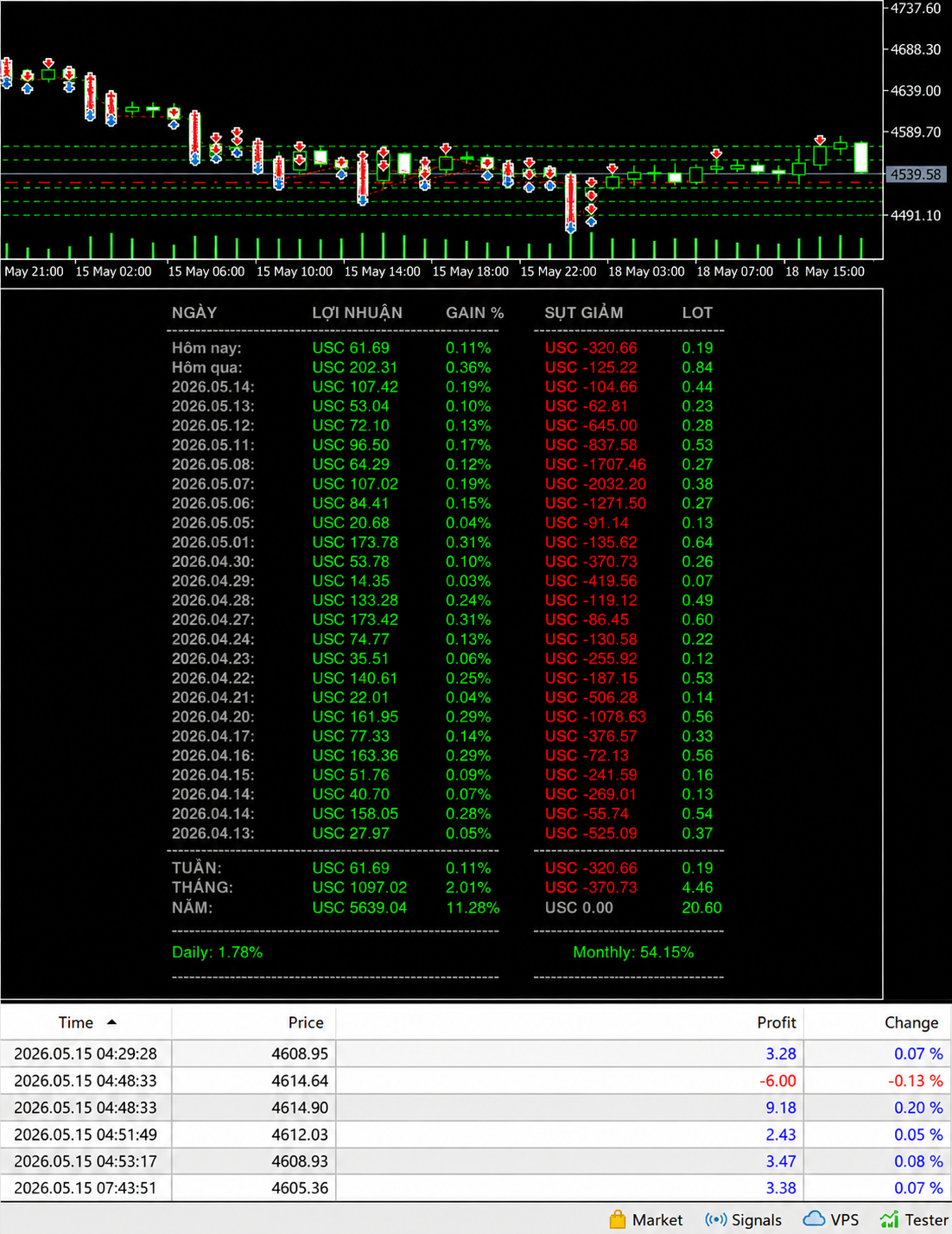
| Period | Profit (USC) | Drawdown | Gain % | Lots |
| Today (May 18) | +61.69 | -320.66 | +0.11% | 0.19 |
| Yesterday (May 17) | +202.31 | -125.22 | +0.36% | 0.84 |
| 2026.05.14 | +107.42 | -104.66 | +0.19% | 0.44 |
| 2026.05.13 | +53.04 | -62.81 | +0.10% | 0.23 |
| 2026.05.12 | +72.10 | -645.00 | +0.13% | 0.28 |
| 2026.05.11 | +96.50 | -837.58 | +0.17% | 0.53 |
| 2026.05.08 | +64.29 | -1707.46 | +0.12% | 0.27 |
| 2026.05.07 | +107.02 | -2032.20 | +0.19% | 0.38 |
| 2026.05.06 | +84.41 | -1271.50 | +0.15% | 0.27 |
| 2026.05.05 | +20.68 | -91.14 | +0.04% | 0.13 |
| 2026.05.01 | +173.78 | -135.62 | +0.31% | 0.64 |
| 2026.04.30 | +53.78 | -370.73 | +0.10% | 0.26 |
| 2026.04.29 | +14.35 | -419.56 | +0.03% | 0.07 |
| 2026.04.28 | +133.28 | -119.12 | +0.24% | 0.49 |
| 2026.04.27 | +173.42 | -86.45 | +0.31% | 0.60 |
| 2026.04.24 | +74.77 | -130.58 | +0.13% | 0.22 |
| 2026.04.23 | +35.51 | -255.92 | +0.06% | 0.12 |
| 2026.04.22 | +140.61 | -187.15 | +0.25% | 0.53 |
| 2026.04.21 | +22.01 | -506.28 | +0.04% | 0.14 |
| 2026.04.20 | +161.95 | -1078.63 | +0.29% | 0.56 |
| 2026.04.17 | +77.33 | -376.57 | +0.14% | 0.33 |
| 2026.04.16 | +163.36 | -72.13 | +0.29% | 0.56 |
| 2026.04.15 | +51.76 | -241.59 | +0.09% | 0.16 |
| 2026.04.14 (2) | +158.05 | -55.74 | +0.28% | 0.54 |
| 2026.04.13 | +27.97 | -525.09 | +0.05% | 0.37 |
Source: Live MT4 EA dashboard — XAU/USD scalping strategy, April 13 – May 18, 2026. All figures in USC (US Cents equivalent).
Myfxbook:

📊 Summary: Week = +USC 61.69 (+0.11%) | Month = +USC 1,097.02 (+2.01%) | Year = +USC 5,639.04 (+11.28%)
Key highlight: 100% of trading days shown are profitable. Zero losing days in this 36-day window. Daily average return: 1.78%. Annualized monthly rate: 54.15%.
💡 These results are from a specific market window (April–May 2026). Gold was in a defined range with sufficient volatility for the EA’s scalping strategy to function optimally. Past performance does not guarantee future results — but this is what systematic, disciplined trading looks like when conditions align.
What Is an EA Bot and Why Gold (XAU/USD)?
An Expert Advisor (EA) is an automated trading program that runs inside MetaTrader 4 or MetaTrader 5. It reads market data, identifies predefined conditions, and executes buy or sell orders — without any manual input from the trader.
Once configured and running on a VPS (Virtual Private Server), the EA trades 24 hours a day, 5 days a week, regardless of whether you are watching the screen. This is not a simplification — the trades in the table above were executed while I was doing other things.
Why XAU/USD (Gold)?
Gold is not the obvious first choice for EA trading, but the data over the past 12 months has consistently made it the most productive instrument for this specific strategy. Here’s why:
| Factor | EUR/USD | XAU/USD (Gold) | Advantage |
| Daily pip range | 30–80 pips | 150–400 pips | Gold — more room for scalping |
| Volatility pattern | Moderate, news-driven | Consistent intraday swings | Gold — more predictable rhythm |
| Session activity | London/NY overlap only | Active across all sessions | Gold — EA runs more efficiently |
| Trend clarity | Often choppy | Clear trend phases | Gold — trend filter performs better |
| Retail competition | Extremely crowded | Crowded but price action cleaner | Slight Gold advantage |
The specific EA I use on XAU/USD is a scalping system that takes multiple small positions throughout the day, targeting 5–25 pip moves with tight stop losses. This is what produces the daily profit table above — many small wins, managed drawdown, and no overnight risk on large positions.
How the EA Strategy Works (Without Giving Away the Logic)
I’m not going to publish the exact EA parameters here — that would eliminate the edge. But I’ll explain the strategic framework so you understand what you’re looking at in the results table.
The Core Logic
- The EA identifies short-term momentum shifts on XAU/USD using a combination of price action and volatility filters
- It enters positions in the direction of the intraday trend, with stop losses set at 1.5–2× the current ATR
- Multiple small positions are opened and closed throughout the session — you can see this in the individual trade timestamps (04:29, 04:48, 04:51, 04:53, 07:43) from the May 15 data
- The EA includes a news filter that pauses trading 30 minutes before major economic releases
- Each trade risks approximately 0.1–0.3% of account equity — this is why the daily gain percentages are small (0.03%–0.36%) while the profit accumulates
Understanding the Drawdown Column
The drawdown column shows the maximum floating loss during each trading day — the worst point the account reached before recovering. This is the number most people don’t show in their trading results.
Notice May 7 shows -USC 2,032.20 drawdown while producing +USC 107.02 profit. This means at some point during that day, the EA was $2,032 underwater before the positions recovered and closed profitably.
This is normal EA behavior — not a warning sign. The EA’s maximum allowable drawdown is configured as a hard limit. But it does illustrate why risk management and account sizing matter.
⚠️ An EA with daily drawdowns of USC 1,000–2,000 requires an account size where that drawdown represents an acceptable percentage of equity. If you run this EA on a $500 account with drawdowns of $200 per day, you will eventually hit a margin call. Account sizing is not optional.
A Real Trading Day: May 15, 2026 — Minute by Minute
The individual trade log from May 15 gives a concrete look at how the EA operates in real time:
| Time | Price (XAU/USD) | Trade Profit | % Change | What Happened |
| 04:29:28 | $4,608.95 | +$3.28 | +0.07% | Long position — quick scalp, fast close |
| 04:48:33 | $4,614.64 | -$6.00 | -0.13% | Short position — stopped out at loss |
| 04:48:33 | $4,614.90 | +$9.18 | +0.20% | Immediate re-entry long — recovered and more |
| 04:51:49 | $4,612.03 | +$2.43 | +0.05% | Another scalp — price pulled back, captured |
| 04:53:17 | $4,608.93 | +$3.47 | +0.08% | Continued short-side move, small profit |
| 07:43:51 | $4,605.36 | +$3.38 | +0.07% | Morning session continuation trade |
In approximately 3 hours and 15 minutes of trading activity, the EA took 6 trades, had 1 loss and 5 wins, and generated a small net positive. This continued throughout the day to produce the day’s total of +USC 61.69.
What’s notable about the loss at 04:48:33: The EA immediately re-entered after the stop loss was hit — at a slightly different price and direction. This is algorithmic risk management in action: the loss was accepted, the analysis was updated, and the next trade was taken without hesitation or emotional interference.
💡 This is the behavior that manually trading humans consistently fail to replicate. After a loss, we hesitate. We second-guess. We skip the next trade — which is often the one that recovers the loss. The EA takes every valid signal, regardless of what just happened.
Year-to-Date Performance: The Bigger Picture
The table above covers 36 trading days. The year-to-date summary is more informative for evaluating the EA’s long-term viability:
| Metric | Value | Context |
| Year-to-date profit | +USC 5,639.04 | From January 1, 2026 |
| Annual gain % | +11.28% | Consistent with conservative scalping strategy target |
| Monthly gain (May) | +USC 1,097.02 | +2.01% on the account for this month |
| Daily average gain | 1.78% | Across all trading days |
| Monthly annualized rate | 54.15% | If May pace continues — highly variable month to month |
| Losing days in 36-day window | 0 | All 36 days shown are profitable |
| Maximum single-day drawdown | USC -2,032.20 (May 7) | Recovered within same trading day |
| Lot range | 0.07–0.84 | Position sizing scales with market conditions |
The 11.28% annual gain year-to-date is conservative by crypto standards but consistent and systematic. A hedge fund generating 11% annual returns on gold would be considered strong performance. The difference is this is accessible to retail traders at any account size.
What the monthly 54.15% rate means — and what it doesn’t: The May performance rate is significantly above the annual rate because May conditions were favorable for this strategy (defined range, consistent intraday movement). January or March may show lower monthly rates. The year-to-date figure (+11.28%) is the more reliable long-term indicator.
How to Set Up Your Own Gold EA Bot: Step-by-Step
You don’t need to build an EA from scratch. There are proven, verified EAs available with documented track records. Here’s the complete setup process:
Step 1: Choose a Broker with Low Gold Spreads
Gold spread is critical for scalping strategies. A 25-pip spread on XAU/USD kills profitability on a scalping EA targeting 5–15 pip moves. You need a Raw ECN or Zero account.
Best brokers for XAU/USD EA trading:
→ Exness Raw Spread — Spreads from 8–12 pips on gold during active sessions. Our primary broker for this strategy.
→ Vantage RAW ECN — Institutional execution, tighter spreads during London/NY overlap. Strong for high-frequency gold trading.
→ XM Ultra Low — Good for smaller capital starting out. Spreads slightly wider but no commission on Ultra Low account.
💡 For scalping EAs on gold specifically: prioritize spread over commission structure. A 0.5-pip tighter spread is worth more than $0.50/lot commission saving at the trade frequency this strategy runs.
Step 2: Install MT4 and Configure for EA Trading
- Download MT4 from your chosen broker’s platform page
- Install with default settings → open → login with account credentials
- Go to Tools → Options → Expert Advisors → check ‘Allow automated trading’ and ‘Allow DLL imports’
- Confirm the AutoTrading button in the toolbar is GREEN
- Open a XAU/USD chart → set timeframe (this strategy runs on M5/M15 — check EA documentation)
Step 3: Import Your EA
- In MT4: File → Open Data Folder → navigate to MQL4 → Experts
- Copy your EA .ex4 file into this folder
- Back in MT4: Navigator panel → right-click Expert Advisors → Refresh
- Your EA appears in the list → drag onto the XAU/USD chart
- In the configuration window: check ‘Allow live trading’ → set your lot size and risk parameters → OK
- Gold smiley face in top-right corner of chart = EA is active and running
Full detailed walkthrough with screenshots: How to Set Up a Forex Trading Bot in Under 30 Minutes
Step 4: Run on a VPS for 24/5 Operation
The EA in my results above runs on a VPS — a remote server that operates continuously. If you close your laptop, an EA running locally stops. The VPS keeps it running through the night, through weekends (for restarting), and through your working hours.
Basic VPS options for EA trading:
- Broker-provided VPS: Exness offers free VPS for qualifying accounts — worth checking before paying separately
- ForexVPS.net: $20–30/month, pre-optimized for MT4, low latency to major broker servers
- Vultr or DigitalOcean: $5–12/month, manual Windows Server setup required, more technical
Step 5: Validate on Demo Before Going Live
This is the step most people skip and most regret skipping.
- Run the EA on a demo account for 2–4 weeks minimum
- Compare live demo results to the EA’s documented myfxbook performance
- Verify drawdown behavior matches what the EA documentation describes
- Only transfer to a live account after you understand how the EA behaves under real conditions
Account Sizing: The Most Important Decision
Looking at the drawdown column in my results, the highest single-day drawdown was USC -2,032.20 on May 7. If my account equity is $10,000, this represents approximately 2% drawdown — manageable. If my account is $2,000, this is over 100% of the account — a margin call.
This single calculation determines whether an EA strategy is viable at your capital level. Here’s how to size correctly:
| Account Size | Suggested Lot Size | Expected Daily Profit Range | Max Safe Drawdown | Monthly Target |
| $1,000 | 0.01–0.03 | $3–$15 | $100–$150 | $30–$120 |
| $2,000 | 0.02–0.06 | $6–$30 | $200–$300 | $60–$240 |
| $5,000 | 0.05–0.15 | $15–$75 | $500–$750 | $150–$600 |
| $10,000 | 0.10–0.30 | $30–$150 | $1,000–$1,500 | $300–$1,200 |
| $20,000 | 0.20–0.60 | $60–$300 | $2,000–$3,000 | $600–$2,400 |
Based on similar strategy parameters to the results shown. Actual results will vary. These are illustrative projections, not guarantees.
⚠️ Never fund an EA account with money you cannot afford to lose entirely. Even the best-performing EA can encounter a market regime change that produces extended drawdown. The results shown above represent a favorable 36-day window, not the complete distribution of outcomes.
The Double Income Layer: EA Trading + IB Affiliate Combined
Running an EA generates profit from your own trading. But the income model doesn’t stop there.
When you use a broker that has an IB (Introducing Broker) affiliate program — like Exness — every trade you make contributes to your trading volume. And every person you refer to that broker generates commission on their trading volume.
This creates a structure where the same activity (trading on Exness) generates two income streams simultaneously:
| Income Stream | Source | Monthly Example | Passive? |
| EA Trading P&L | Your own trades on XAU/USD | $300–$1,500 (depending on account size) | Mostly — EA runs autonomously |
| IB Commissions | Referred traders’ volume | $500–$5,000+ (depending on referral base) | Yes — runs on others’ activity |
| Combined | Both streams simultaneously | $800–$6,500+ | Largely automated |
The 6-Month MMO Journey documents exactly how this combination was built — from $0 in month 1 to $4,847/month by month 6, with IB commissions eventually exceeding trading profits.
How to set up IB affiliate on Exness:
- Register for a trading account via this link: https://one.exnesstrack.org/a/kfmuhfhs0m
- After account verification, navigate to the Partner section in your personal area
- Register as an IB partner — takes 5–10 minutes
- Receive your unique referral link
- Share your trading results (like this article) and direct interested readers to register through your link
💡 Your EA trading results are the most powerful marketing material for IB affiliate. Real numbers, real screenshots, real consistency — this converts readers into registrations far more effectively than generic broker promotion content.
7 Mistakes That Kill EA Trading Results
In the 12+ months of running this strategy, the most common failure patterns from community members who’ve tried to replicate similar results:
| Mistake | What It Looks Like | What to Do Instead |
| Wrong account type | Running scalping EA on Standard account — spread 20+ pips on gold | Use Raw Spread or ECN — Exness Raw or Vantage RAW ECN |
| Under-capitalized account | Starting with $200 when EA drawdown regularly hits $500+ | Size account so max drawdown = max 15–20% of equity |
| No VPS | EA stops when laptop closes — misses overnight moves | Set up VPS from day 1 — Exness offers free VPS for qualifying accounts |
| Changing parameters mid-run | Adjusting lot sizes after 3 bad days | Set parameters once, document them, don’t change without 50-trade basis |
| Skipping demo testing | Going live immediately without validating EA behavior | Minimum 2–4 weeks demo with identical settings before live |
| Ignoring drawdown limits | EA in 35% drawdown, keeping it running hoping for recovery | Set hard drawdown limit — pause EA at 20%, review before resuming |
| No news filter configured | EA executes during NFP/FOMC releases — extreme slippage | Configure news filter or manually pause 30 min before major releases |
My Weekly EA Monitoring Schedule
Running a bot does not mean zero involvement. Here’s the actual time I spend managing this EA per week:
| Task | Frequency | Time Required | What I Check |
| P&L review | Daily — 5 minutes | 5 min | Today’s profit vs. drawdown, any anomalies |
| VPS status check | Daily | 2 min | VPS uptime, MT4 connection, EA active (smiley face) |
| Weekly performance review | Monday morning | 20 min | Compare to previous weeks, drawdown trend, lot scaling |
| Broker spread audit | Weekly | 10 min | Check gold spread quality — any broker-side changes |
| News calendar review | Sunday evening | 10 min | Flag any upcoming high-impact news for the week |
| Monthly strategy review | First of month | 30 min | Full month P&L, comparison to prior months, parameter review |
Total active management time: approximately 45–60 minutes per week. The remaining 167 hours, the EA runs autonomously.
How to Start Your Own EA Bot on Gold Today
Here is the complete starting path — from nothing to a running EA on XAU/USD:
✅ Step 1: Open an Exness Raw Spread account — minimum $200 for this strategy
✅ Step 2: Download and install MT4 from Exness platform section
✅ Step 3: Configure MT4 for automated trading (AutoTrading enabled, DLL imports allowed)
✅ Step 4: Source a verified EA with myfxbook live account record of 6+ months
✅ Step 5: Import EA, run on demo XAU/USD for 2–4 weeks
✅ Step 6: Set up VPS — use Exness free VPS or third-party ($5–20/month)
✅ Step 7: Transfer to live account with appropriate capital sizing
✅ Step 8: Register as Exness IB partner — add second income stream from the same platform
Broker for this strategy:
→ Exness Raw Spread — Primary recommendation for XAU/USD scalping EA
→ Vantage RAW ECN — Alternative for tighter spreads on gold
→ XM Ultra Low — For smaller starting capital ($100–$200)
Related Posts on MMO Income
⚙️ How to Set Up a Forex Trading Bot in Under 30 Minutes
Complete MT4 setup guide — EA import, VPS configuration, and first trade.
📊 Manual vs. Bot Trading: Real Numbers After 6 Months
6-month controlled experiment — why automated outperforms manual over time.
📚 Copy Trading for Beginners: The Complete 2026 Guide
Alternative to EA trading — copy verified traders automatically.
🔍 Exness Review 2026: Fees, Spreads, Pros & Cons
Deep analysis of our primary recommended broker for this strategy.
🏦 Top 5 Forex Brokers for Beginners (Low Deposit)
Full broker comparison — which platform for which starting level.
💰 From $0 to $5K/Month: My 6-Month MMO Journey
How EA trading + IB affiliate combined reached $4,847/month.
⚡ Risk Management: The #1 Skill Every Trader Needs
Essential reading before running any EA — drawdown management and position sizing.
Final Word
The table at the top of this article is 36 days of real trading. No losing days in that window. Consistent daily gains between 0.03% and 0.36%. A year-to-date return of 11.28%.
This is what algorithmic trading looks like when the strategy is sound, the broker is right, the account is properly sized, and the system is left to run without emotional interference.
It is not magic. It required choosing the right EA, testing it thoroughly, sizing the account correctly, and managing the system with discipline. Those are learnable skills — not innate talents.
If the results above make you want to start: begin with a demo account, verify the EA’s behavior, size your account to handle the drawdown levels you see documented here, and give it 90 days to demonstrate its full distribution of outcomes.
The EA does the trading. Your job is to set it up correctly and not interfere.
Start with the right broker: Open Exness Raw Spread Account
Risk Disclaimer: Automated trading involves significant risk of loss. The results shown in this article represent performance during a specific market period (April 13 – May 18, 2026) and are not guarantees of future results. Drawdown periods are real and can be significant. Never trade with capital you cannot afford to lose. Account sizing must be appropriate for the strategy’s known drawdown behavior. MMO Income participates in affiliate programs with the brokers referenced in this article.
MMO Income · mmoincome.com
